Organize Your Chaos: The Ultimate Daily Planner To-Do List Guide
Let’s be honest about the modern workflow: it is rarely linear. Whether you are a graphic designer juggling client revisions, a small business owner managing inventory, or a content creator mapping out a posting schedule, the "out of sight, out of mind" trap is real. We often think that because we live in a digital age, our planning tools must be purely digital. However, there is a distinct cognitive benefit to the physical act of writing. This is where a tool like the DAILY PLANNER │to DO LIST becomes less about stationery and more about strategy. It bridges the gap between chaotic thought and structured execution, offering a tangible anchor in a sea of notifications.
The Psychology of the Physical Page in a Digital World
There is a reason why many top-tier marketers and brand strategists still keep a physical notebook on their desks. Writing by hand engages the brain differently than typing. It forces you to slow down, process the information, and prioritize. The DAILY PLANNER │to DO LIST capitalizes on this by providing a dedicated space that isn't competing with browser tabs or email alerts.
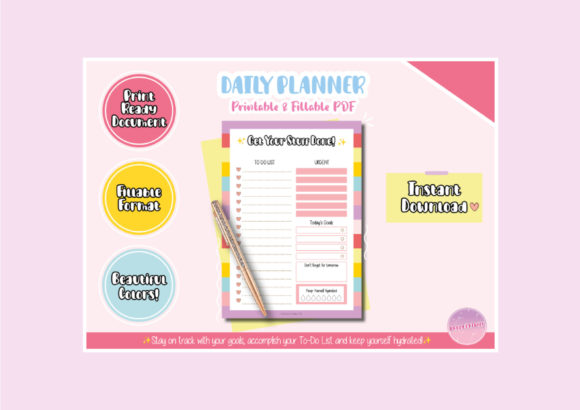
Visually, this planner rejects the sterile, minimalist "corporate gray" aesthetic that plagues so many productivity tools. Instead, it embraces a colorful, fun, and cute design. Do not mistake "cute" for unprofessional; in the world of design and branding, personality is currency. A vibrant layout can actually boost dopamine levels, making the mundane task of scheduling feel less like a chore and more like a creative session. It turns your to-do list into a piece of visual content you actually want to interact with.
Practicality Meets Aesthetic: The Design Assets
For the creative professional, the utility of a planner lies in its flexibility. The DAILY PLANNER │to DO LIST is designed as a "dateless" system. This is a crucial feature for anyone who doesn't work a standard 9-to-5 or who might miss a day. You aren't wasting paper; you simply pick up where you left off.
From a design perspective, the file structure is built for versatility. It functions as a premium design asset that adapts to your specific medium:
- For the Tactile Creator: If you love the feel of paper, this is a printable file. It comes in A4, A5, Letter, and Half Letter sizes. This variety is essential for crafters and hobbyists who might be using specific binder systems like a Happy Planner or a Filofax. You can print the same PDF repeatedly, ensuring your planning system never runs out of pages.
- For the Digital Nomad: If you prefer a paperless workflow, the fillable PDF is ready to use. You can type directly into the fields using Adobe Acrobat on your laptop, tablet, or phone. This keeps your handwriting legible and allows for easy editing when priorities shift—which they always do.
Integrating Planning into Your Brand Identity
You might wonder how a daily planner fits into a discussion on brand identity or modern typography. The answer lies in consistency. A brand is built on consistent output, and consistent output requires rigorous organization.
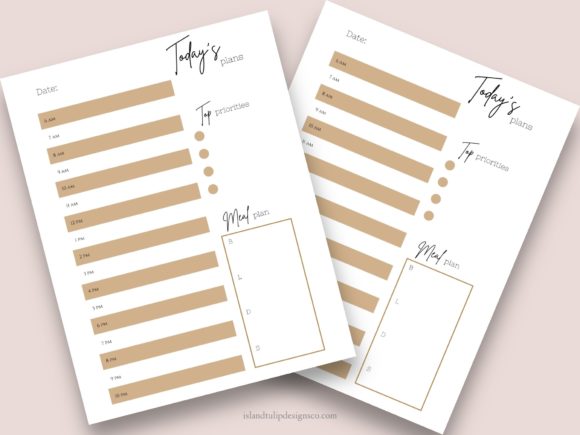
Think of this planner as the "backstage pass" to your creative work. While your audience sees your polished social media graphics or editorial design, this tool is what keeps the production line moving. The inclusion of specific sections for Water Intake and Notes acknowledges that productivity is holistic. You cannot design effectively if you are dehydrated or if your thoughts are scattered across sticky notes.
Furthermore, the aesthetic of the planner can influence your own creative mindset. When you surround yourself with well-designed tools—even something as simple as a to-do list—it sets a standard for your own work. It is a subtle reminder that details matter, a philosophy that applies equally to logo design, packaging design, and web design.
Maximizing the "Notes" Feature for Creative Projects
The package includes a "Notes Freebie" available in five colors and multiple sizes. For designers and marketers, this is where the real utility shines. Do not limit these to simple grocery lists. Use them as micro-canvas for brainstorming.
- Thumbnail Sketching: Use the note sections to quickly sketch out layout ideas for a client presentation before moving to the computer.
- Color Palette Logging: When you see a color combination in the wild that inspires you, jot down the hex codes or describe the hues in the notes section.
- Client Feedback: Keep a running log of verbal feedback received during phone calls so you can transcribe them later.
The fact that these files are instant download assets means you can start this process immediately. There is no lead time for shipping, and no setup fees. It is a low-investment, high-return tool for streamlining your daily operations.
A Tool for Every Niche
The versatility of the DAILY PLANNER │to DO LIST makes it suitable for a wide array of professionals. It is not just a generic notebook; it is a structured system that can be adapted to different workflows.
For entrepreneurs, the structure helps in breaking down large, overwhelming goals into manageable daily actions. For bloggers, it serves as an editorial calendar on a micro-level, ensuring that content production stays on track. Even for those in commercial font sales or digital assets, tracking daily outreach and customer support is vital.
The design avoids the trap of being too "whimsical" to be taken seriously, yet it avoids the boredom of a standard grid. It strikes a balance that appeals to adults who appreciate aesthetics but demand functionality. It acknowledges that your planner is an accessory to your workspace, and like any good typeface or piece of furniture, it should reflect your personal style while serving a purpose.
Final Thoughts on Workflow Optimization
In the end, the best system is the one you actually use. Many complex planning methodologies fail because they require too much overhead to maintain. The strength of the DAILY PLANNER │to DO LIST lies in its simplicity and its dual-format nature. Whether you are highlighting tasks with a marker on a printed sheet or typing updates into a fillable field on your iPad, the friction is removed.
By organizing your day in a "cute" yet structured way, you remove the mental clutter that hinders creativity. You free up mental bandwidth to focus on what matters: the work. Whether you are strategizing a new font pairing for a brand identity or planning a product launch, having your tasks, notes, and hydration goals in one single sheet is not just a convenience—it is a competitive advantage.