Secret Quest: Adding Realistic Bronze Depth to Your Designs
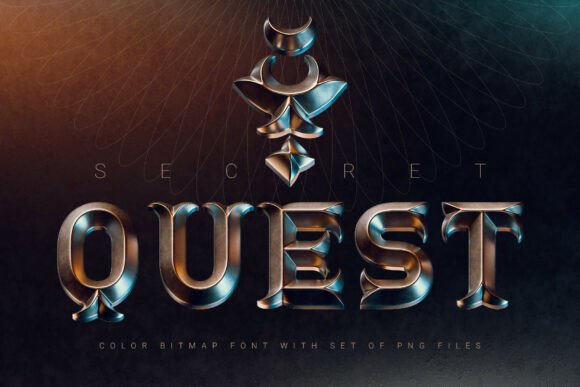
In the world of digital design, flat text often struggles to grab attention. You can tweak the kerning, adjust the weight, and change the color, but sometimes standard typography just feels like it’s missing a layer of dimension. If you are looking to break away from the standard 2D look and inject a tangible, tactile quality into your work, Secret Quest offers a compelling solution. It is a bold 3D color font that captures the essence of realistic bronze metal, wrapped in a classic medieval aesthetic that feels both nostalgic and fresh.
The Power of Realistic 3D Typography
Secret Quest isn’t just a standard vector typeface with a bevel effect applied in post-production. It is a color bitmap OpenType-SVG font. This means the texture, lighting, and depth are baked directly into the font file itself. When you type a letter, you aren't just rendering a shape; you are stamping down a high-resolution rendering of cast bronze. The realistic metal finish gives every character a heavy, tactile presence that flat fonts simply cannot replicate. It creates an immediate visual hierarchy, making your titles pop off the screen or the page.
The aesthetic leans heavily into a classic, fantasy-inspired style. It evokes imagery of ancient maps, hidden treasures, and epic adventures. However, because the rendering is so realistic, it avoids looking cartoonish. It sits in a sweet spot between stylized fantasy and high-end design assets, making it versatile enough for various creative projects.
Where to Use Secret Quest
Understanding where this typeface shines is key to using it effectively. Because of its detailed surface and 3D depth, Secret Quest is best used as a display font. Think of it as the headline act, not the supporting cast. It is not designed for body copy or long paragraphs, but rather for the moments where you need to make an immediate impact.
Here are a few practical applications where this font excels:
- Gaming and Entertainment: This is the natural home for Secret Quest. It is perfect for game titles, interface headers, or fantasy novel covers. If you are designing a poster for a Dungeons & Dragons campaign or a mobile RPG, this font sets the tone instantly.
- Logo Design and Branding: For brands that want to convey heritage, durability, or craftsmanship, a bronze finish speaks volumes. Think of a microbrewery, a specialty coffee roaster, or a construction company. Using Secret Quest in a logo can suggest that the brand is solid, established, and trustworthy.
- Social Media Graphics: In a fast-scrolling feed, texture stops thumbs. Using Secret Quest for YouTube thumbnails or Instagram story headers can add a premium feel to your content, distinguishing it from the standard sans serif fonts used by the majority of creators.
- Merchandise and Packaging: The high-resolution nature of the font makes it suitable for print. It works beautifully on T-shirt designs, mug prints, or packaging labels where you want a metallic look without the cost of actual foil stamping.
Readability and Visual Hierarchy
One of the most important considerations when using a premium font with such distinct character is how it influences readability. Secret Quest performs best at larger sizes. When scaled down too small, the intricate details of the bronze texture can become muddy or noisy. To maintain professionalism, ensure your headlines are large enough to showcase the craftsmanship of the typeface.
In terms of visual hierarchy, Secret Quest naturally commands the top position. It draws the eye immediately. This allows you to use much simpler typefaces for your subheadings and body text. A clean, modern sans serif or a simple serif font pairs exceptionally well with Secret Quest. The contrast between the highly textured, medieval display font and a clean, modern body font creates a balanced layout that is easy to navigate but visually stimulating.
Technical Considerations and Usability
It is important to understand the technology behind Secret Quest to get the most out of it. As an OpenType-SVG font, it relies on specific software capabilities to render the color and texture correctly. The good news is that the industry has largely caught up to this technology. You can use Secret Quest seamlessly in modern versions of the Adobe Suite (like Photoshop, Illustrator, and InDesign), as well as Affinity Designer and Procreate.
However, there are limitations. Because the font is essentially a series of high-resolution images, it does not behave like a standard vector font in all environments. You cannot easily change the color of the text in the same way you would with a standard OTF file; the color is part of the font data. Additionally, it supports only the English language and basic punctuation. Always review the included character screenshot before purchasing to ensure it has the specific symbols you need for your project.
Maximizing Your Investment
When you download Secret Quest, you aren't just getting the font file. The package includes high-resolution PNG files with transparent backgrounds. This is a massive advantage for designers. If you are using software that doesn't support OpenType-SVG, or if you need to use the letters as individual graphic elements in a collage, the PNG files provide the flexibility to do so. With an average resolution of 9 megapixels, these files are sharp enough for large-format printing.
To evaluate if this font fits your brand identity, consider the personality of your project. If your brand voice is futuristic, minimalist, or corporate, a 3D bronze medieval font might create a disconnect. But if your brand values storytelling, history, adventure, or craftsmanship, Secret Quest can be a cornerstone of your visual identity.
Ultimately, Secret Quest