Jellybean Giraffe: A Playful Alphabet for Bold Brands
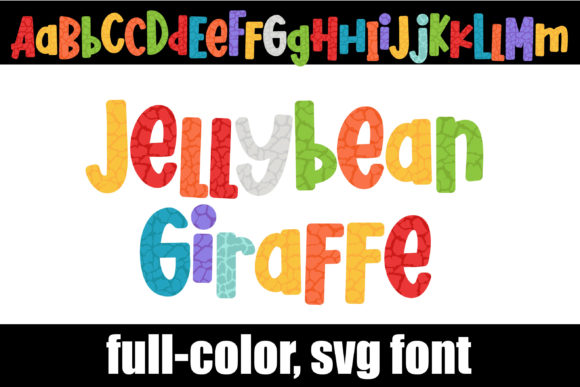
If you’ve ever watched a child sort a bag of jellybeans by color, you understand the pure, unadulterated joy of a vibrant palette. Now, imagine that energy infused into a full alphabet. That’s the essence of Jellybean Giraffe. This isn’t just another decorative typeface; it’s a full-color SVG font that brings a unique, tangible texture to digital text. The design features a classic giraffe print pattern, but instead of traditional browns and yellows, each spot is filled with a randomized, candy-inspired color mix. It’s whimsical, it’s bold, and it immediately grabs attention.
More Than a Pretty Pattern: Understanding the Technical Side
Before we dive into creative uses, it’s crucial to understand what makes Jellybean Giraffe different from a standard .ttf or .otf font. As an OpenType full-color (SVG) font, it contains embedded vector graphics with color information. This means the color you see is part of the font file itself, not something you apply later in your software. This technology allows for incredibly complex and detailed designs that were previously impossible with standard fonts.
Installing it is straightforward—it’s an .otf file that you install like any other font via FontBook on a Mac or your preferred font manager or Control Panel on Windows. However, compatibility is key. The colors will only render in programs that support the SVG format. Adobe Photoshop, Illustrator, Silhouette Studio, QuarkXPress, and Inkscape are among those that do. In non-compatible programs, the font will appear as a solid black silhouette of the giraffe pattern. Even in compatible software, the font preview window often shows it in black; you’ll only see the full color once you type on your canvas. It’s also important to note that the OTF and TTF files are not compatible with Cricut machines, a critical consideration for crafters.
Where Jellybean Giraffe Truly Shines: Project Applications
This is a display font through and through. Its intricate, colorful pattern means it’s not designed for body text or long paragraphs. Instead, think of it as a spotlight—a tool for emphasis. Its personality is playful, creative, and youthful, making it a fantastic choice for projects targeting children, families, or brands that want to convey fun and imagination.
- Branding & Logo Design: A logo for a toy store, a children’s boutique, a candy shop, or a creative workshop could use Jellybean Giraffe for its wordmark or monogram. It builds instant brand recognition through its unique texture.
- Packaging Design: Imagine this font on the packaging for a line of gourmet jellybeans, a children’s snack, or a colorful craft kit. It communicates the product’s fun nature before it’s even opened.
- Editorial & Social Media: Use it for pull quotes, magazine headlines, or Instagram story text that needs to stop the scroll. It’s perfect for announcements, sale tags, or event posters with a playful theme.
- Web Design & Digital: As a hero headline on a website’s landing page, it can set a vibrant tone. It’s also excellent for email newsletter headers or digital invitation designs.
- Personal & Commercial Crafting: While not for Cricut, it’s perfect for creating custom digital designs in Silhouette Studio for printable stickers, greeting cards, or wall art sold on platforms like Etsy.
Practical Guidance: Making the Font Work for You
Choosing a premium font like this is an investment, so here’s how to evaluate and use it effectively. First, always test it in your specific software environment before committing to a final design. Create a sample document to ensure the colors render correctly and the file performs as expected.
When it comes to font pairing, balance is everything. The visual complexity of Jellybean Giraffe demands a simple, clean partner. A neutral sans-serif font for supporting text is a safe and effective choice. Think of fonts like Helvetica, Arial, or Open Sans. For a more stylistic contrast, a clean serif font like Georgia could also work. Avoid pairing it with other ornate script fonts or handwritten fonts, as this will create visual chaos and harm readability.
Consider the visual hierarchy in your design. Use Jellybean Giraffe for the primary headline or key call-to-action. Let it draw the eye, then use your paired, simpler font for the subheading and body copy to deliver the message clearly. This approach maintains professionalism while showcasing creativity.
Finally, review the licensing. This font is a commercial asset, and understanding its allowed uses—whether for personal projects, client work, or merchandise—is essential for maintaining brand integrity and avoiding legal issues. Its strength lies in its ability to inject personality into a brand identity, but that impact is best leveraged in targeted, high-visibility applications rather than across every single piece of text.
In a world of minimalist sans-serifs and elegant serifs, Jellybean Giraffe is a burst of confetti. It’s a specialized tool for designers, marketers, and creators who need to make a joyful, memorable statement. Used thoughtfully, it can transform a standard design into something that truly engages an audience and leaves a lasting, colorful impression.